Player Market: buy, sell and collect
Fixed-price listings in Gold or CPs that work while the seller is offline.
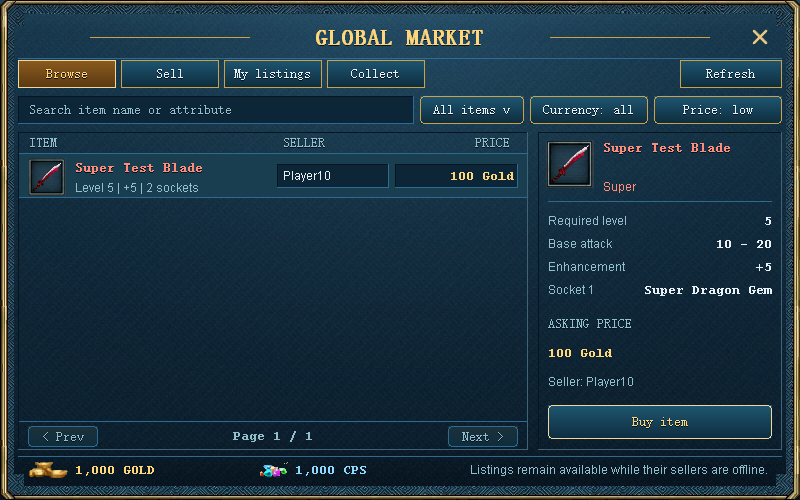
Press F8 or type /market. Browse listings, inspect the actual item properties, and compare the total price for the entire item or stack. The seller can be offline.
Sell an item
- Use the Market from any map while alive and fully logged in.
- Open Sell, select an eligible inventory item and set Gold or CPs and a total price.
- Confirm the listing. The whole item or stack leaves your bag and is held by the Market until bought or cancelled.
- After a sale, use Collect to receive the proceeds. Cancelled items return through Collect.
Buy and collect
Select a listing and confirm the currency and price. After purchasing, open Collect and claim the item with a free inventory slot. Seller proceeds are collected separately. An amount above a wallet limit remains in the Market rather than disappearing.
Limits and excluded items
You can have 20 active listings per character. Prices range from 1 to 999,999,999. You cannot buy your own listing. This version has fixed prices and no bids. The current economy setting applies no seller fee; check the listing confirmation for the quoted proceeds.
Equipped, warehouse, bound, locked, suspicious, inscribed and timed items cannot be listed. Memory agates, non-tradable items and temporary purification/refinery items are excluded. Finish trading, vending, poker or cross-server activity first. Permanent supported item properties are preserved.
Refresh and offline selling
Listings persist independently of your connection and survive restarts. The old 48-hour expiry has been removed, including for historical active listings. You do not need to use /offline to keep a listing available. Reopen or refresh if a change is not visible. Collect displays pending items and aggregate earnings, not a detailed receipt for each sale.
See the interface
Something different in game? Tell Support the page title and what you found.