Atelier wardrobe and cosmetic purchases
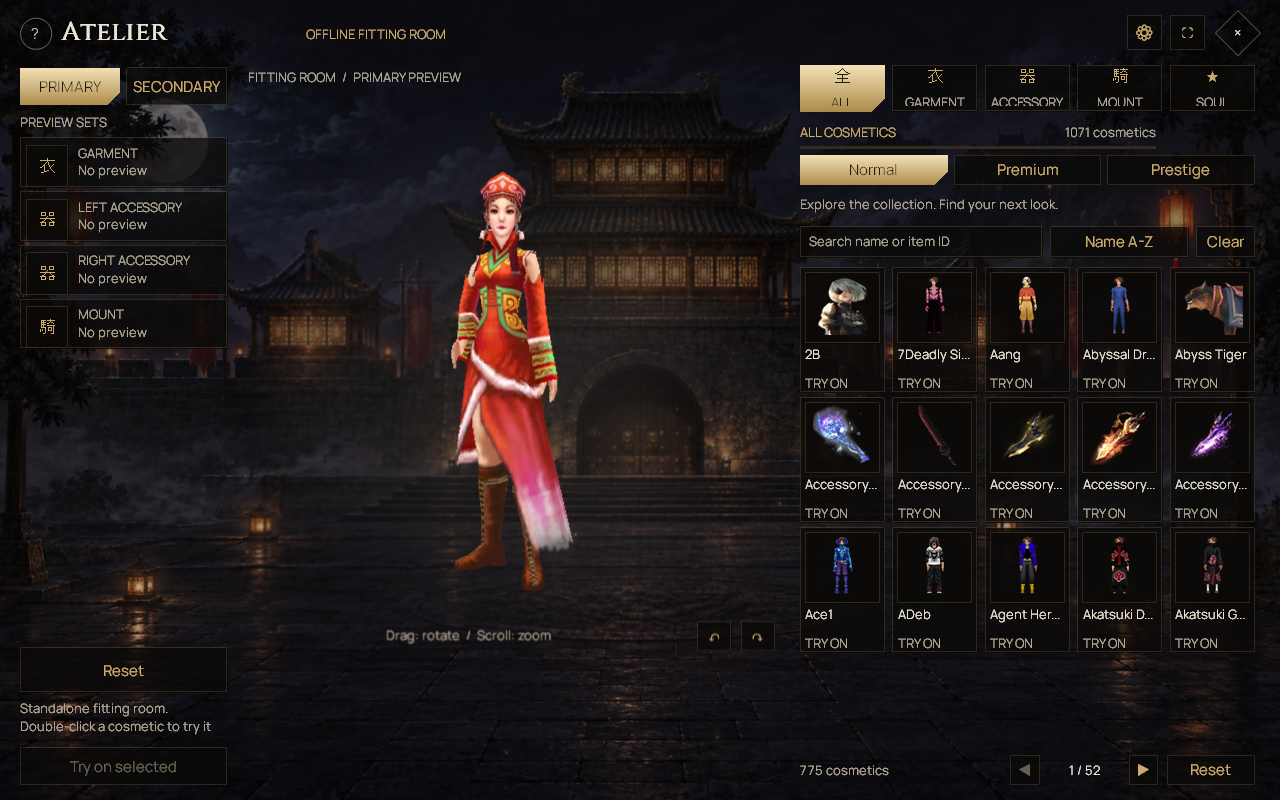
Try on garments, accessories and mounts, then choose whether to buy or wear.
Click the Wardrobe icon or type /atelier, /wardrobe or /wardrobestudio. These open the same Atelier companion. It is available without VIP membership. Keep the game and companion updated together through AsuraLauncher.
Browse and try on
- Choose Garment, Accessory or Mount, then a Normal, Premium or Prestige tier.
- Search by name or item ID and select an appearance.
- Use the fitting room to inspect it. Drag to rotate and scroll to zoom. Trying on does not equip or buy an item.
- For an owned item, use the appropriate Wear action. For an unowned item, inspect the price and purchase confirmation.
Connected garment browsing filters out appearances restricted to the other character sex. Offline fitting-room browsing is unrestricted. The Primary and Secondary previews follow the corresponding equipment sets; switching preview tabs does not switch your live combat set.
Price guide
| Category | Normal | Premium | Prestige |
|---|---|---|---|
| Garment | 25,000 CPs | 300,000 CPs OR 15 VIP Points | 45 VIP Points |
| Accessory | 12,500 CPs | 150,000 CPs OR 5 VIP Points | 15 VIP Points |
| Mount appearance | 25,000 CPs | 150,000 CPs OR 5 VIP Points | 15 VIP Points |
Item-specific exceptions exist: garments 183555, 187555 and 187965 cost 500,000 CPs, with their 15-VIP-Point option preserved. The selected item's server quote is authoritative. Normal items do not have the standard VIP option, and Prestige does not have a standard CP option.
Effects and ownership
Eligible owned Premium/Prestige garments support custom effect selection. A preview choice is temporary until Save effect succeeds. Auto uses the garment's authored effect and Off suppresses it. Removed catalog items are not available for new Atelier purchases; existing owned items are not deleted by catalog removal.
The old Twin City GarmentCollector and AccessoryCollector placements have been removed. Use Atelier for the current cosmetic catalog. Hair, Color and Face preview controls from older screenshots have also been removed.
See the interface
Something different in game? Tell Support the page title and what you found.